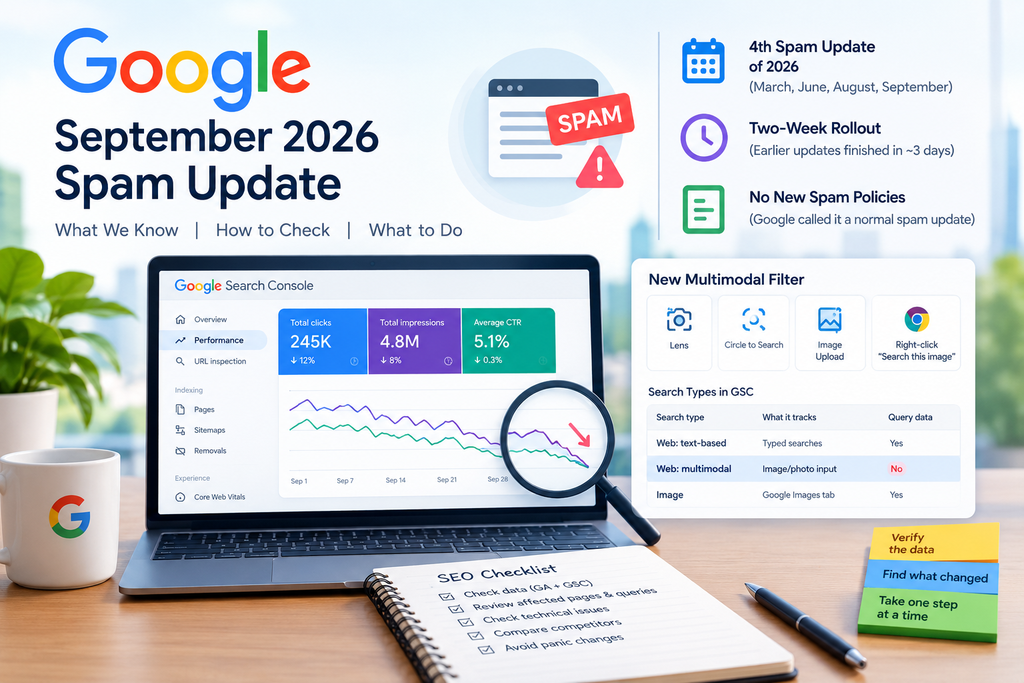
Google announced the September 2026 spam update on September 24. It applies globally to all languages and may take up to two weeks to roll out. The same day, Google added a new image-based view to Search Console. If your traffic looks odd this week, it’s tempting to blame the update and start rewriting pages. Don’t. This guide covers what Google actually said about the Google spam update, how to read your data calmly, and what the new Search Console filter can and can’t show you.
What The September 2026 Google Spam Update Actually Said
Google shared very little, so let’s stick to the facts:
- It’s the fourth spam update of 2026, following updates in March, June and August.
- Google called it a normal spam update, so no new spam policies came with it.
- Google named no spam category, no share of affected queries and no market expected to move most.
- The earlier 2026 spam updates each finished within about three days, but this one has a two-week window.
Some SEOs speculate that the update may focus on image and video search because the timing overlaps with the new Search Console report. That is only a guess, and Google hasn’t said so.
Why A Two-Week Rollout Changes How You Read Your Data
A long rollout means rankings may still be moving. A one-day swing tells you little while the rollout is still active. Google says it will update its ranking release history page when the rollout ends, so check there before you draw conclusions.
The most common mistake is reacting too fast. People see a drop, assume the Google spam update caused it, and change titles, content, links and technical settings all at once. Then nobody can tell what helped or hurt.
A 7-Step Checklist When Traffic Drops After A Google Spam Update
A traffic drop is a symptom, not automatically a diagnosis. Here’s a calm order of operations:
- Confirm the data. Check Google Analytics and Search Console. Did clicks, impressions, rankings or conversions actually fall?
- Check the timing. Compare the change with the rollout dates, but don’t assume the update caused it.
- Find what changed. Break the data down by page, query, device and country instead of staring at the sitewide total.
- Rule out technical issues. Look at indexing, robots.txt, noindex tags, canonicals, server errors, migrations and recent deployments.
- Compare the results pages and competitors. Did the search results themselves change?
- Consider other causes. Seasonality, demand shifts, tracking problems and manual actions can all cause declines.
- Avoid panic changes. Change one thing at a time, so you can learn from it.
If you work with clients, say this to them: “First, let’s establish exactly what changed. We’ll find the affected pages and queries, rule out technical and tracking problems, and then decide whether any action is justified.”
Google’s spam policies cover cloaking, hidden text, doorway pages, scaled content abuse, expired domain abuse and site reputation abuse, among others. Review them honestly. If your site doesn’t break these rules, a dip is more likely to be noise or a normal ranking shift. Also know the limits: Google’s documentation says recovery after fixing spam can take months, and lost link-spam benefits cannot be regained.
The New Multimodal Filter: Image Search Data In GSC Explained
This is where people get confused. The new report is not the old Image search type. Google split the Web search type into text-based and multimodal views. The old Image, Video and News types stay separate.
What The Multimodal Filter Covers
It covers searches made through Google Lens, Circle to Search on Android, image uploads to Google Search, and Chrome’s right-click “Search this image” option. Google says this traffic was not counted anywhere in the report before.
What It Can’t Tell You
Because these searches mostly use images instead of text, the Queries dimension isn’t available for them. You can see pages, clicks and impressions, but not what the person photographed. The Search Analytics API doesn’t list a multimodal type yet, so use the Export button. The feature is still rolling out, so you may not see it on every property.
| Search type | What it tracks | Query data |
| Web: text-based | Searches typed into the standard search bar | Yes |
| Web: multimodal | Web results reached with an image, photo or screenshot | No |
| Image | Results shown in the Google Images tab | Yes |
How To Read Image Search Data Without Overreacting
Treat this report as a discovery tool, not a diagnosis tool. Here’s a sensible approach:
- Filter to multimodal in the Performance report and open the Pages tab.
- Look at clicks, impressions and CTR for the pages that appear.
- Spot the gaps. Pages with many impressions but few clicks may need better images, clearer filenames, stronger alt text or more helpful surrounding content.
- Compare over time. A short window proves very little, especially while a rollout is still active.
- Keep it separate. Don’t assume a multimodal change came from the Google spam update. Two things happened on the same day, and that alone doesn’t link them.
One honest limit: I haven’t yet pulled this report for a client site, so this section is a how-to guide, not a case study. Sites that rely on visual content, like products, places and recipes, are the likeliest to see meaningful numbers. Others may see almost nothing.
Common Mistakes To Avoid
- Blaming every ranking change on the Google spam update
- Making many edits at once
- Judging results from a two- or three-day window
- Expecting keyword data from the multimodal view
- Ignoring technical checks because “it must be the update”
FAQ
How long does the September 2026 spam update take?
Google says up to two weeks from September 24. Check Google’s ranking release history page for the official end date.
Does the multimodal report replace the Image search type?
No. Image search describes where a result appeared. Multimodal describes what the searcher used as input.
Can I get multimodal data through the API?
Not yet, as far as current documentation shows. Use the Export button.
Conclusion: Verify First, Then Act
The Google spam update is a reminder to stay evidence-driven. This week, do one thing: compare Search Console data from before and after the update, find which pages and queries gained or lost clicks and impressions, and investigate those specifics. Then explore the new multimodal filter as a bonus source of insight. Change one thing at a time.
If your website experiences a sudden traffic or ranking drop after a Google update, working with an SEO Expert in Kochi can help you identify what actually changed before making unnecessary adjustments. A detailed SEO analysis can include Google Search Console data, keyword rankings, affected pages, indexing issues, technical factors, and competitor movements. By focusing on evidence rather than reacting to algorithm updates with quick fixes, businesses can develop a more informed SEO strategy and protect their long-term organic visibility.